Set HTTP Request Body Size in Go

Use http.MaxBytesReader to limit and control the size of the HTTP request body. This is a good practice to prevent abuse and save bandwidth. In the example below, I set a 20 bytes HTTP request body size limit. package main import ( "github.com/julienschmidt/httprouter" "io" "log" "net/http" "time" ) func main() { router := httprouter.New() router.HandlerFunc(http.MethodPost, "/", func(w http.ResponseWriter, r *http.Request) { buffer, err := io.ReadAll(http.MaxBytesReader(w, r.Body, 20)) defer r.Body.Close() if err != nil { w.WriteHeader(http.StatusBadRequest) log.Println(string(buffer)) return } log.Println(string(buffer)) }) httpServer := &http.Server{ Addr: ":8080", Handler: router, ReadTimeout: 120 * time.Second, WriteTimeout: 120 * time.Second, } log.Fatal(httpServer.ListenAndServe()) } Test Content Length 20 bytes ...

October 23, 2023 · John Pili
boot-linux-without-a-splash-screen.webp

Boot Linux without a splash screen

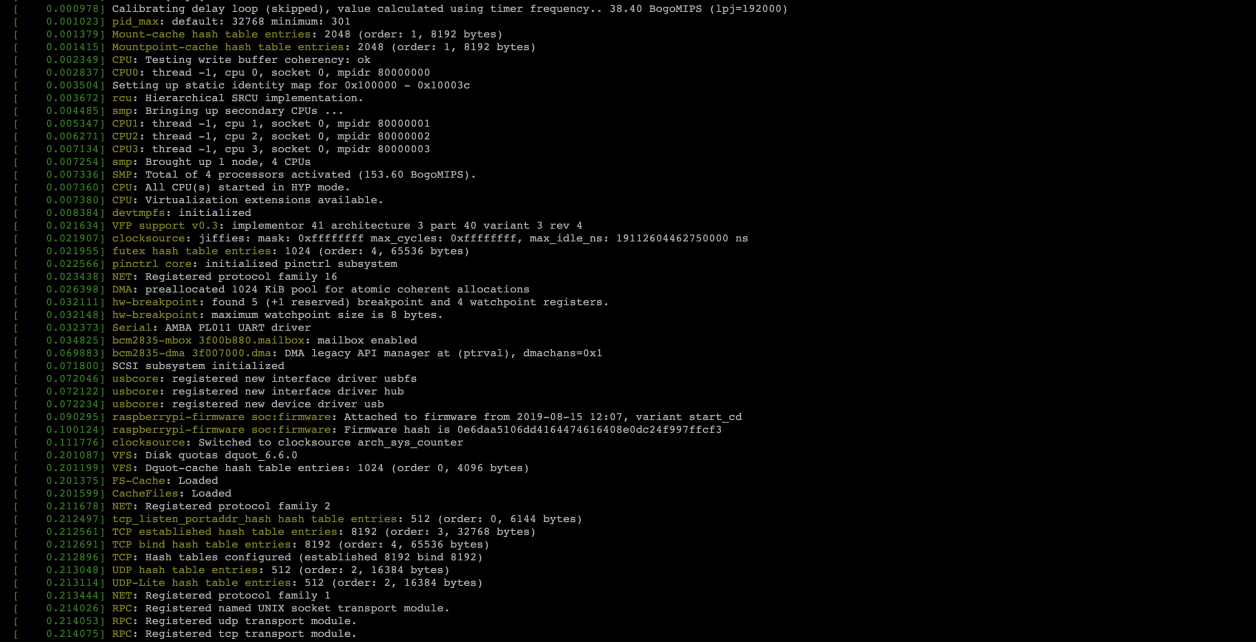
If you prefer to boot up your Linux machine with the boot messages rather than the distro splash screen. You can enable that by editing the file /etc/default/grub and set the value of GRUB_CMDLINE_LINUX_DEFAULT to an empty string. Example: GRUB_DEFAULT=0 GRUB_TIMEOUT=5 GRUB_DISTRIBUTOR=`lsb_release -i -s 2> /dev/null || echo Debian` GRUB_CMDLINE_LINUX_DEFAULT="" GRUB_CMDLINE_LINUX="" After editing the file, execute update-grub to load your configuration into the bootloader. sudo /usr/sbin/update-grub Output of update-grub Generating grub configuration file ... Found background image: /usr/share/images/desktop-base/desktop-grub.png Found linux image: /boot/vmlinuz-6.1.0-10-arm64 Found initrd image: /boot/initrd.img-6.1.0-10-arm64 Warning: os-prober will not be executed to detect other bootable partitions. Systems on them will not be added to the GRUB boot configuration. Check GRUB_DISABLE_OS_PROBER documentation entry. Adding boot menu entry for UEFI Firmware Settings ... done

August 5, 2023 · John Pili
start-a-react-project-without-using-cra.webp

Start a React project without using CRA

Let’s start a React project without using create-react-app (CRA). CRA is a good project starter but for those who wants a complete control over the building process, we will have to use bundler tools like webpack or yarn. Prerequisites React.js knowledge Installed and configures NodeJS Installed node package manager (npm) Steps Using the command-line, let us follow the following steps: Create directories and files mkdir webapp cd webapp Let us continue with our src folder and placeholder files ...

May 30, 2023 · John Pili
pragmatic-programmer-its-your-life.webp

The Pragmatic Programmer - It's your life

A sound bite from The Pragmatic Programmer: Your Journey To Mastery, 20th Anniversary Edition (2nd Edition) Interested? You can grab a copy of this book from Amazon. https://www.amazon.com/Pragmatic-Programmer-journey-mastery-Anniversary/dp/0135957052

January 17, 2023 · John Pili
change-your-ssh-server-port-to-reduce-brute-force-attacks.webp

Change your SSH server port to reduce brute force attacks

Reduce SSH brute force attacks by changing your default SSH server (sshd) port from port 22 to a different one. Below is a sshd log example of a brute force attacks. Changing the port You can change the default port by editing the sshd configuration file. sudo nano /etc/ssh/sshd_config Find the line that say #Port. Remove the # symbol and set the port number you prefer. Refer to the image below as reference. ...

December 27, 2022 · John Pili
rsync-with-different-ssh-port.webp

Rsync with different SSH port

Some Linux servers were security hardened by changing the default SSH port from port 22 to a different port number. To use rsync with a different SSH port, add ‘ssh -p 12345’ in the rsync parameters. Push rsync -azvP -e 'ssh -p 12345' SOURCE USER@HOST:DEST Pull rsync -azvP -e 'ssh -p 12345' USER@HOST:SOURCE DEST

December 26, 2022 · John Pili
golang-with-recaptcha.webp

Golang with reCAPTCHA

Google’s reCAPTCHA is one of the tool we can use to stop malicious internet bots from abusing our web applications. It comes in two versions, reCAPTCHA v2 and v3. Version 3 uses a score-based method with no user interaction. Version 2 uses a checkbox that will require users to answer a question. In this tutorial we will focus on reCAPTCHA v2. Prerequisite This tutorial requires the following: Registered Google webmaster account Domain registered property in Google webmaster Created Google reCAPTCHA account – https://www.google.com/recaptcha/admin/ Knowledge of Go’s build toolchain Required site and secret keys ...

December 18, 2022 · John Pili
embed-resources-in-go.webp

Embed Resources in Go

The go:embed feature was introduce in Go 1.16. It lets you embed resources into the compiled application. Prior to version 1.16, developers uses external tooling to do this. With go:embed you can embed images, webpages, email templates, predefined SQL statements or an entire directory. That’s neat! Usage Examples Embedding a text file in a string //go:embed version.txt var version string Embedding a binary file //go:embed product-catalog.pdf var catalog []byte Embedding a directory filesystem //go:embed template/* var templateFS fs.FS Embedded resources in httprouter Project Structure ...

December 18, 2022
Python batch file MD5 checksum generator and checker

Python batch file MD5 checksum generator and checker

I am backing-up a large number of files to another computer when this idea came to me to write a Python script that generate and validate batch MD5 checksum. Feel free to customize the script according to your needs.

March 2, 2022 · John Pili
python-rename-files-that-begins-with-matching-string.webp

Python rename files that begins with matching string

Do you want to rename a number of files that begins with a specific name or string? I wrote this small Python script that does that. Of course, you can also do this with Bash or Powershell. I hope somebody might find it useful. import os import sys from os import path parameters = sys.argv[1:] if len(parameters) == 0: print(f"usage: {sys.argv[0]} <startswith-string>") sys.exit(0) if len(parameters) > 0: for file in os.listdir(): if file.startswith(parameters[0]) and path.isfile(file): old_name = file new_name = file[len(parameters[0]):] print(f"Renaming {old_name} -> {new_name}") os.renames(old_name, new_name)

February 27, 2022 · John Pili